CategoriesMRP Services for Smart Manufacturing & Production Planning | ERPbyNet

Production Planning Simplified: Why MRP software Is the Core of Smart Factories

Step onto the floor of any growing manufacturing unit during peak production, and it’s like watching a high-stakes juggling act. Machines roar, operators wait on delayed approvals, and procurement teams make their best guess on what to order next. Raw materials run low while reports pile up—and everyone’s just hoping the chaos doesn’t bring the line to a halt. It’s not strategic planning—it’s reactive firefighting.

Too many manufacturers still rely on spreadsheets, tribal knowledge, and late-night intuition to manage production. But with customer timelines shrinking and supply chains growing more complex, this outdated approach is a ticking time bomb. From production delays to stock overruns and material shortages, the cost isn’t just operational—it hits your bottom line and brand credibility.

That’s where MRP software changes the game. As the core engine of smart factory environments, MRP software synchronizes your materials, workforce, and workflows to actual demand—turning guesswork into precision. In this blog, we’ll explore how modern MRP software works, how it powers Industry 4.0 innovations like IoT and automation, and how ERPByNet’s ERP platform puts manufacturers in full control of their production planning.


What Is MRP and Why It Matters More Than Ever

Material Requirements Planning, or MRP, is a system that calculates the materials and components required to manufacture a product. It ensures that inventory levels are kept just right—not too much to tie up capital, not too little to halt production.

The concept first gained popularity in the 1970s, born out of a need for precision in manufacturing. Since then, MRP has evolved into a cornerstone of ERP (Enterprise Resource Planning) platforms. In smart factories today, it plays a more strategic role—integrating with IoT sensors, automation tools, and production schedules to create a lean, responsive production environment.

In other words, MRP transforms your shop floor from reactive chaos into a synchronized, data-driven ecosystem.

MRP in the Era of Industry 4.0

MRP in the Era of Industry 4.0

Interlinking IoT and Real-Time Data

In the modern smart factory, machines aren’t just mechanical—they’re digital collaborators. IoT devices embedded in machinery now feed real-time data into your ERP system. From temperature readings to runtime logs, this data empowers the MRP engine to make informed decisions on-the-fly.

Imagine a machine goes down unexpectedly. With IoT-connected alerts and predictive maintenance insights, your MRP module recalibrates production timelines and reorders parts automatically, reducing downtime and waste.

Automation: Beyond the Assembly Line

Automation isn’t just about robots on the factory floor. It extends to scheduling, procurement, and quality control. MRP, integrated within ERPbyNET’s system, leverages automation to:

  • Auto-generate purchase orders when stock levels drop
  • Schedule job orders based on machine availability
  • Align deliveries with vendor performance data 

This shift from manual coordination to automation means fewer delays and more consistent throughput.

Lean Manufacturing Principles Baked In

Lean isn’t just a buzzword—it’s a necessity. Excess inventory, waiting time, overproduction, and defects cost time and money. MRP supports lean manufacturing by ensuring you’re only procuring what you need, when you need it. It forecasts demand based on past data, current orders, and supplier timelines, enabling smarter procurement and reduced waste.

With ERPByNet’s resource planning software, lean practices are no longer aspirational—they’re operationalized.

Use Case: How One Factory Reduced Stockouts by 87%

A mid-sized precision engineering firm in Pune faced persistent raw material shortages despite having months of inventory data. The reason? Their procurement was reactive. Purchases were made manually, often based on last month’s usage, not actual demand.

After implementing ERPByNet’s integrated ERP platform with MRP capabilities:

  • Stockouts fell by 87% within the first quarter
  • Lead time on key components dropped by 40%
  • Inventory carrying costs reduced by 22% 

All because production planning was no longer a guessing game—it became a science.

Key Components of an Effective MRP software

Key Components of an Effective MRP software

Bill of Materials (BOM)

MRP starts with the BOM—a comprehensive list of raw materials, components, and subassemblies needed to manufacture a product. ERPByNet automatically maps BOMs to sales orders, ensuring accurate demand forecasting.

Master Production Schedule (MPS)

This outlines what needs to be produced, in what quantity, and by when. Our MRP engine adjusts the MPS dynamically based on real-time demand, capacity, and constraints.

Inventory Status File

ERPByNet gives you a live view of inventory across all locations—what’s in stock, what’s in transit, and what’s committed to production.

Procurement & Supply Coordination

When MRP identifies a shortage, the system triggers procurement orders instantly. It also accounts for supplier lead times and price variations, helping you stay within budget.

MRP vs. Traditional Planning Tools

Feature ERPByNet MRP System Spreadsheets / Legacy Tools
Real-Time Material Visibility Yes No
Automated Purchase Triggers Yes Manual
BOM Integration Dynamic Static or External
Demand Forecasting Predictive AI-Backed Historical Guesswork
Supplier Management Integrated with Lead Times Siloed
Waste Reduction High Low


The Bigger Picture: MRP as a Growth Enabler

Implementing MRP is not just a production move—it’s a growth strategy. When you have reliable production planning:

  • Sales can commit to delivery dates with confidence
  • Procurement can negotiate better vendor terms
  • Finance can forecast cash flow with precision
  • Customers enjoy timely deliveries and better service 

The result? A resilient supply chain, higher margins, and faster scale-up capacity. In fact, according to a Forrester survey, manufacturers that adopted ERP-integrated MRP systems improved delivery performance by 19% and reduced operational costs by 25% within the first year.

Where ERPByNet Fits Into Your Smart Factory Strategy

Where ERPByNet Fits Into Your Smart Factory Strategy

At ERPByNet, we don’t believe in one-size-fits-all ERP. Our custom ERP solutions are tailored to the unique challenges of manufacturers navigating Industry 4.0.

Whether you’re building circuit boards or producing modular furniture, our MRP module is designed to:

  • Sync with IoT infrastructure
  • Support automation at every workflow stage
  • Drive lean, sustainable production 

Our team ensures that production planning software becomes the backbone of your factory—not just another tool you have to manage.

With real-time dashboards, configurable alerts, supplier portals, and predictive reports, ERPByNet brings visibility and control to every stage of your production lifecycle.

Conclusion: MRP Is the Control Tower of Your Smart Factory

You wouldn’t fly a plane without a flight plan—so why run a factory without MRP? As manufacturers embrace digitization, the need for intelligent, responsive production planning is non-negotiable. MRP sits at the core of this transformation—connecting sales, inventory, procurement, and production into a seamless flow.

And when powered by modern ERP platforms like ERPByNet, MRP doesn’t just help you survive in today’s market—it sets you up to lead it.

At ERPByNet, we equip manufacturers with ERP systems that think, adapt, and grow with you. Ready to elevate your production strategy? Let’s plan smarter, together.

Name

FAQs

Still have questions about MRP and how it fits into your factory? Let’s clear them up.

What’s the difference between MRP and ERP?

MRP focuses on materials and production planning, while ERP covers broader business functions like finance, HR, and CRM. At ERPByNet, MRP is a core module within our ERP suite.

Can MRP help if we have unpredictable customer demand?

Yes. Our MRP system uses historical sales data and real-time input to adjust production and procurement dynamically—even for fluctuating demand cycles.

Is MRP only for large manufacturers?

Not at all. MRP is crucial for small and mid-sized manufacturers looking to improve delivery reliability, manage costs, and scale efficiently.

How does MRP support lean manufacturing?

MRP minimizes excess inventory, aligns production with real demand, and reduces wait times—directly supporting lean principles.

Can ERPByNet’s MRP module integrate with our existing machines or IoT tools?

Yes. ERPByNet supports API integrations and IoT compatibility, allowing data from shop floor machines to directly inform planning and decision-making.

How long does it take to implement an MRP system with ERPByNet?

Implementation timelines vary, but most clients are fully operational within 6–8 weeks with our guided onboarding process.
 

CategoriesERP (Enterprise Resource Planning)

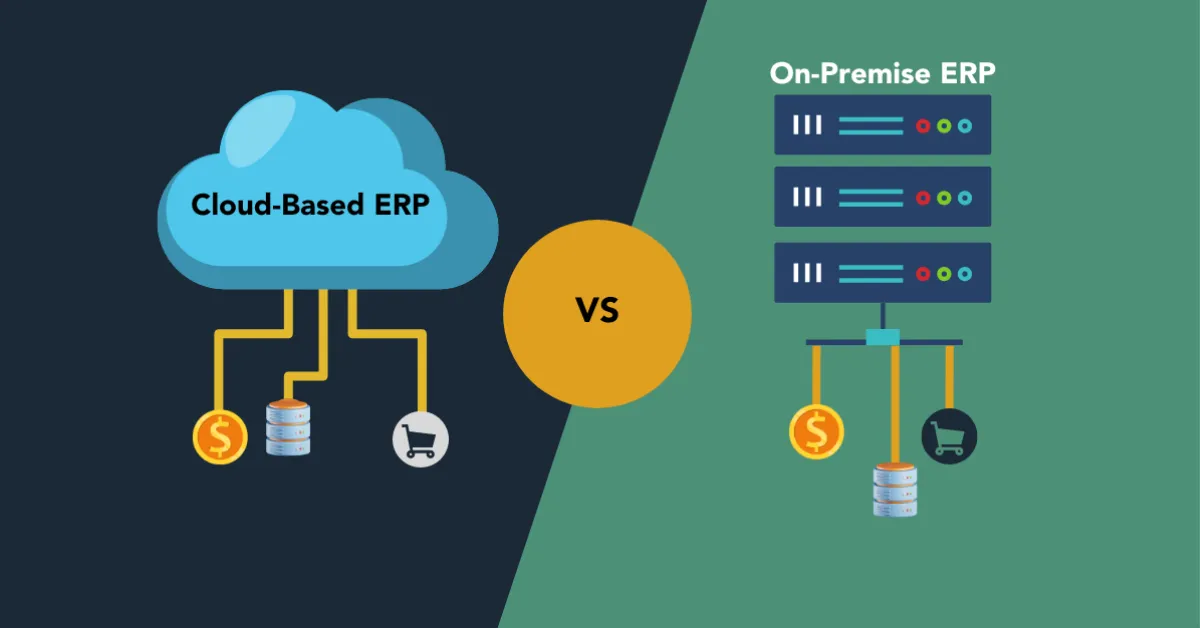
Cloud-Based ERP vs. On-Premise ERP: What’s Right for Your Business

Your business is growing—but your systems aren’t keeping up. One moment you’re chasing customer orders, the next you’re buried in mismatched spreadsheets, double entries, and late-night file hunts. Sound familiar? It’s the classic case of operational sprawl, where disconnected tools slow down momentum and every department speaks a different tech language.

Most startups and scaling businesses hit this wall. HR runs on one platform, finance on another, and inventory is tracked in someone’s aging Excel sheet. Friday fire drills become routine, and your growth engine starts to sputter.

Enter ERP — the solution that promises unity, real-time insights, and control. But not all ERP systems are the same. Should you go with a flexible, cost-effective cloud ERP or invest in the control-heavy reliability of an on-premise ERP system?

In this blog, we cut through the noise and give you a clear, side-by-side comparison of both. From accessibility to cost, scalability to security, we explore what works best for your business in 2025. At ERPByNet, we don’t just sell software — we help you build smarter systems that grow with you. Let’s find the ERP fit that transforms your chaos into clarity.


What is ERP — and Why Does It Matter in 2025?

ERP implementation stages across departments

ERP stands for Enterprise Resource Planning, a business software system that brings your processes, data, and teams under one digital roof. It connects your departments — from inventory to payroll to sales — through shared databases, automation, and real-time reporting.

Historically, ERP was a bulky, expensive setup reserved for enterprise giants. Systems like SAP and Oracle defined the early era. But with today’s cloud platforms like NetSuite, Zoho, and ERPByNet’s AceMRP, ERP is now accessible, modular, and scalable for startups and growing businesses.

In a fast-moving digital economy, relying on disconnected software can leave you in the dark. ERP brings operational visibility, ensures process consistency, and helps you stay compliant — all while reducing manual errors and missed opportunities.

What is On-Premise ERP?

On-Premise ERP refers to enterprise resource planning software that is physically installed on your company’s servers and managed by your internal IT team. Instead of relying on a vendor’s infrastructure or internet-based access, your data, software, and customizations reside on your own premises.

This model was the industry standard before the rise of cloud computing. Large enterprises often chose on-premise ERP systems for their high degree of customization, direct control over security, and ability to meet complex regulatory requirements.

For example, a manufacturing company with sensitive trade data might prefer on-premise ERP to maintain full control over its systems, particularly if they already have the infrastructure and IT staff to support it.

What is Cloud-Based ERP?

Cloud-based ERP, on the other hand, is hosted on the vendor’s servers and accessed via the internet. There is no need to purchase physical hardware or worry about manual software updates. You simply log in from a browser or app, and the ERP system is ready to go — whether you’re in the office or on the move.

This model is particularly attractive for small to midsize businesses that need fast deployment, minimal maintenance, and scalable costs. Your software is updated regularly by the vendor, your data is backed up automatically, and you get access from any device, anywhere in the world.

Cloud ERP helps eliminate silos, simplify compliance, and allow remote teams to work with confidence — all while reducing the overhead of traditional IT management.

Side-by-Side Comparison: Cloud ERP vs. On-Premise ERP

Feature-level comparison of cloud and on-premise ERP systems

Feature Cloud-Based ERP On-Premise ERP
Deployment Hosted by vendor Installed on company servers
Access Anywhere via internet Local network or VPN
Cost Subscription-based Upfront license + maintenance costs
Scalability High — add features as you grow Limited without additional investment
Maintenance Vendor-managed Handled by in-house IT
Customization Moderate, via APIs Deep, often tailored to specific workflows
Security Vendor-managed with certifications Internal responsibility
Implementation Time Typically faster Can take longer depending on infrastructure

When Cloud-Based ERP Makes the Most Sense

You’re Scaling and Need Agility

Cloud ERP platforms allow businesses to expand without infrastructure roadblocks. Whether you open new locations or add new product lines, cloud ERP adapts quickly — no need for new servers or staff.

You Have a Lean IT Team

If your current IT support is limited or outsourced, managing your own ERP installation can be a burden. Cloud ERP eliminates the need for in-house upgrades, data backups, or patching.

You Want Predictable Monthly Costs

With cloud ERP, there’s no large upfront capital outlay. Most pricing models are based on a monthly or annual subscription, helping businesses forecast expenses and preserve cash flow.

You Need Remote and Real-Time Access

From field reps to warehouse staff to remote finance teams, cloud ERP ensures everyone accesses the same data, live. Whether you’re checking dashboards during a business trip or approving purchase orders from home, the system is always on and always current.

When On-Premise ERP Might Be Better

You’re in a Highly Regulated Industry

Some sectors — like defense, finance, and healthcare — require complete control over data storage and access. On-premise ERP systems allow companies to meet strict compliance regulations by managing everything internally.

You Already Have the IT Infrastructure

If you have a robust in-house tech team, servers, and cybersecurity measures in place, maintaining an on-premise ERP can be more economical over the long term.

You Need Heavy Customization

Businesses with highly specialized processes — such as unique manufacturing methods or legacy systems — often prefer on-premise ERP due to its deep customization options.

ERP Adoption Trends in 2025

According to industry research by Software Advice and Gartner, over 60% of growing businesses are choosing cloud ERP due to its ease of use, speed of deployment, and lower upfront costs.

This shift is also driven by broader business needs: remote teams, real-time analytics, mobile accessibility, and the rise of low-code automation. Cloud ERP systems now offer APIs, integration with CRM and HR tools, and AI-powered dashboards for better decision-making.

How ERPByNet Fits In

 ERP System Ownership Hierarchy Chart

At ERPByNet, we build ERP solutions tailored to your business size, industry, and workflow. Whether you need the flexibility of the cloud or the control of on-premise systems, our consultants help design and implement a system that grows with you.

Our AceMRP product includes powerful modules like inventory tracking, accounting, HR automation, and role-based permissions — all accessible through a user-friendly interface that keeps your team productive and in sync.

Conclusion: Choosing the Right ERP is a Strategic Move

Choosing between cloud-based ERP and on-premise ERP isn’t just about technology — it’s about aligning your system with your business vision, budget, and operational needs. In 2025, most startups and SMEs are leaning into cloud ERP for its scalability, lower costs, and real-time capabilities.

At ERPByNet, we believe in ERP that’s designed around your goals — not the other way around. Whether you’re replacing disconnected tools or upgrading an outdated legacy system, we’re here to simplify your operations and support your growth.

Ready to choose clarity over complexity? Let ERPByNet build the ERP solution that fits your future.

Still have questions about ERP and how it fits your business? Let’s clear them up.

What is the main difference between cloud and on-premise ERP?

Cloud ERP is hosted online and managed by the vendor, while on-premise ERP is installed on your company’s servers and managed internally.

Is cloud ERP secure enough for sensitive data?

Yes. Most cloud ERP vendors implement enterprise-grade security protocols, encryption, and regular compliance audits. It’s often more secure than locally managed systems.

Can I switch from on-premise to cloud ERP later?

Yes. Many businesses start on-premise and migrate to the cloud as they grow or restructure. ERPByNet supports both paths and can guide you through migration when you’re ready.

Is on-premise ERP more expensive?

On-premise ERP involves high initial investment in licenses, hardware, and IT personnel. Over time, it may cost less than long-term cloud subscriptions — but only if you already have the infrastructure.

Which industries still prefer on-premise ERP?

Sectors like defense, finance, and healthcare often require strict data control and compliance, which makes on-premise ERP a better fit in some cases.

How fast can ERPByNet deploy a cloud ERP solution?

With our streamlined implementation process, cloud ERP can be deployed in weeks — customized to your workflows and team structure.


CategoriesCRM & Marketing Automation ERP (Enterprise Resource Planning)

The ROI of Real-Time Task Tracking in Mobile ERP Solutions

Struggling with delayed updates, missed deadlines, or endless check-ins? You’re not alone. For growing businesses, managing tasks across departments or remote teams often turns into a game of broken telephone. That’s where real-time task tracking in mobile ERP solutions becomes a game-changer. This blog breaks down the measurable ROI of implementing real-time tracking—from faster task closures and reduced errors to better resource utilization and smarter decisions. With examples from field service, warehouse ops, and finance workflows, we illustrate exactly how live updates can boost performance, accountability, and profitability. We also compare manual task tracking methods (think spreadsheets and sticky notes) with the speed and precision of mobile ERP platforms like ERPByNet’s SiteApp. If your team is constantly waiting for updates, reacting to problems too late, or burning hours on coordination instead of execution, this post shows why real-time ERP isn’t just an upgrade—it’s a strategic investment. You’ll see how mobile-enabled tracking can help streamline your operations, cut costs, and free your teams to focus on what matters most: growing your business. Whether you manage 10 people or 100, real-time task visibility pays off fast—and this article proves it. Ready to rethink how your team works? Start here.

What is Real-Time Task Tracking in a Mobile ERP?

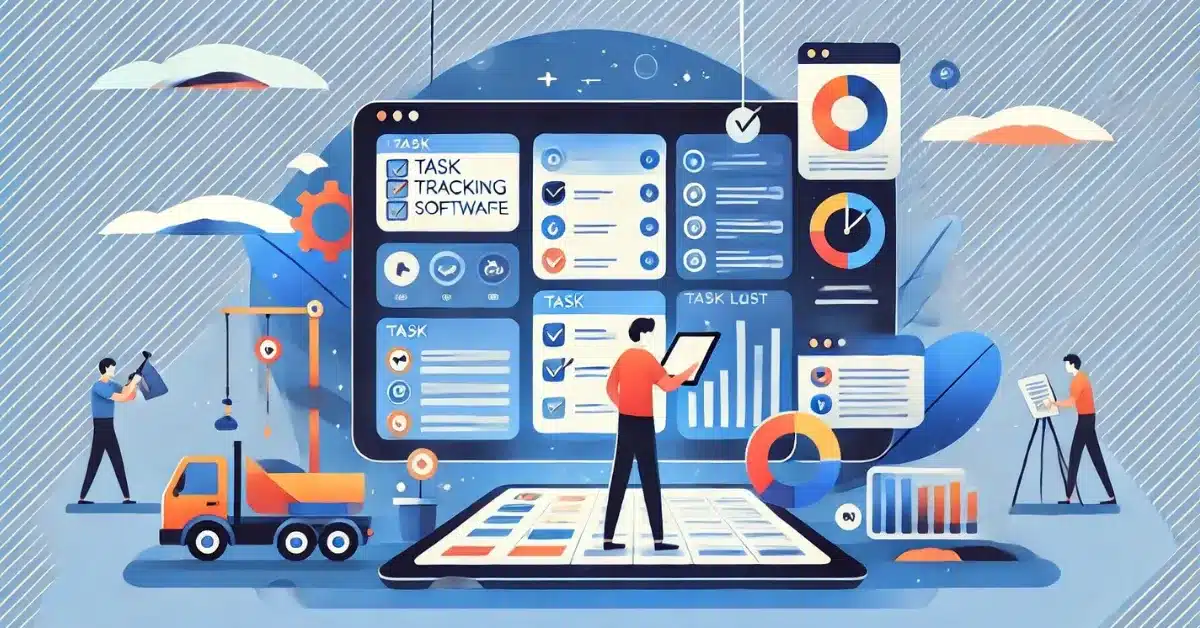
What-is-Real-Time-Task-Tracking-in-a-Mobile-ERP

At its core, real-time task tracking is about visibility and responsiveness. It refers to the ability to:

  • Assign tasks instantly to relevant users
  • Receive immediate status updates (in-progress, delayed, completed)
  • Trigger workflows based on live field inputs
  • Generate reports and notifications on task performance

Mobile ERP platforms extend these capabilities to smartphones and tablets—allowing your employees to update progress, upload documents, or complete checklists from the warehouse floor, job site, or customer location.

ERPByNet’s mobile ERP app supports this functionality with dashboards, approval layers, notifications, GPS tagging, and instant sync with the core system.

Data Doesn’t Lie: Real-Time Tracking Improves Closure Rates

According to a TechValidate survey, companies that implement real-time task tracking through mobile ERP platforms report:

  • 46% faster task closure
  • 34% drop in delays related to miscommunication
  • 31% improvement in compliance and documentation accuracy

Let’s break it down further with two real-world scenarios.

Use Case 1: Field Service & Maintenance

Use Case 1_ Field Service & Maintenance

Before Real-Time ERP
A field technician is assigned three service calls. They receive job details via email in the morning. During the day, task updates are phoned in to a supervisor or written down for later entry. Errors pile up—wrong addresses, missing service parts, or poor time tracking.

After Mobile ERP Implementation
Each task arrives via the mobile ERP app with GPS location, service checklist, and parts needed. The technician checks in upon arrival, updates the task with photos, and closes it digitally on-site. All updates reflect instantly in HQ dashboards.

Impact:

  • Job completion rate rose by 39%
  • Customer complaints dropped by 23%
  • Billing cycle accelerated by 48%

Use Case 2: Warehouse Dispatch and Stock Movement

Before Real-Time ERP
Warehouse operators rely on printed pick-lists. Managers track progress manually or via whiteboards. Misplaced items and double entries cause confusion.

After Mobile ERP Implementation
As soon as a sales order is created, tasks are dispatched to the mobile app. Pickers scan QR codes as they move through the warehouse. Supervisors view a live dashboard of task progress and reallocate work instantly during peak times.

Impact:

  • Inventory discrepancies reduced by 63%
  • Dispatch time improved by 41%
  • Labor utilization rate increased by 28%

The ROI Equation: What’s in It for Your Business?

Real-time task tracking creates ROI through multiple levers:

1. Time Savings

Less time spent chasing status updates means more time for execution. With mobile ERP solutions, approvals, reports, and feedback loops are reduced from days to minutes.

ROI Stat: Businesses saved an average of 9.3 hours per week per team by eliminating manual task status communication, according to a Forrester study on workflow automation.

2. Resource Optimization

Tasks are reassigned dynamically based on real-time workload and availability. Underutilized staff are better deployed, while delays are mitigated early.

ROI Stat: Companies report 21–27% increase in resource efficiency within 3 months of adopting real-time task modules.

3. Better Decision-Making

When managers have real-time insights into bottlenecks, overdue tasks, or performance gaps, decisions improve. Instead of being reactive, they can forecast delays and reroute work.

4. Reduced Costs from Errors and Delays

Every missed handoff or lost task has a price—whether in overtime, rework, or customer churn. Real-time visibility cuts this cost significantly.

ROI Stat: ERP users with mobile task tracking saw a 32% decrease in error-related rework costs within 6 months.

Comparison: Manual Tracking vs. Mobile ERP Task Tracking

Comparison_ Manual Tracking vs. Mobile ERP Task Tracking -

Aspect Manual Tracking (Paper/Excel) Mobile ERP Task Tracking
Update Frequency Delayed Instant
Data Accuracy Low (Manual Entry) High (Live Sync & Logs)
Accountability Ambiguous Role-based & Audited
Decision-Making Hindsight-based Real-time data insights
Task Reassignment Manual, Delayed One-click Reallocation
Cost of Delay/Error High Reduced by up to 30%

Feature Deep Dive: ERPByNet’s Mobile Task Module

Here’s how ERPByNet’s mobile task tracking feature set delivers impact:

  • Live Notifications: Users receive push updates on new tasks, changes, or escalations.
  • Custom Roles: Define who can view, edit, or assign tasks.
  • GPS Integration: Validate field activity with location-based logging.
  • Photo Uploads: Add evidence or proof-of-work with a tap.
  • Real-Time Reporting: Management dashboards update instantly with completion rates and overdue tasks.
  • Offline Sync: Even in low-connectivity areas, data syncs once back online.

These features allow businesses to track everything from site visits to inspection reports to expense claim approvals—all from the palm of their hands.

Long-Term Strategic Benefits

Implementing mobile ERP with real-time task tracking also contributes to:

  • Higher customer satisfaction: Thanks to faster resolution and more predictable service.
  • Better compliance: Digital audit trails and time-stamped activity logs.
  • Scalable operations: As teams grow, workflows stay organized without increasing admin workload.

In other words, task tracking isn’t just tactical—it’s strategic.

Conclusion: Real-Time Isn’t Optional Anymore

In a world where remote teams, customer expectations, and compliance pressures are all rising, real-time task tracking is no longer a “nice to have.” It’s a return-on-investment engine—saving time, cutting costs, and improving output across the board.

Whether you’re managing ten technicians or fifty warehouse pickers, the visibility and control offered by mobile ERP solutions deliver real-world impact.

ERPByNet’s mobile ERP platform is built to give growing businesses the tools they need to move faster, stay accountable, and scale without chaos. Ready to track smarter, not harder?

Let’s get you real-time ready. Explore ERPByNet’s mobile ERP capabilities here

Still have questions about mobile task tracking in ERP? Let’s clear them up.

How does mobile ERP differ from traditional ERP?

Traditional ERP is desktop-bound. Mobile ERP brings the power of ERP to your phone or tablet—ideal for field teams, remote managers, and fast-moving businesses.

Is real-time task tracking useful for small teams?

Absolutely. Even teams of 5–10 can save hours each week by cutting back on status meetings and manual check-ins.

What devices does ERPByNet’s mobile ERP support?

Our platform is available on both Android and iOS and works across smartphones and tablets.

Can I assign tasks by role or department?

Yes. ERPByNet allows role-based task assignment, so tasks are routed automatically to the right team members.

Does mobile ERP work offline?

Yes. Tasks can be completed and saved offline. They sync automatically when your device reconnects to the internet.

How long does implementation take?

Most businesses can go live within 2–4 weeks, depending on the number of workflows and integrations needed.

CategoriesERP (Enterprise Resource Planning)

How Custom ERP Software Can Boost Efficiency and Reduce Costs

You started with what you had. WhatsApp for quick updates. Google Sheets for tracking inventory. Trello for assigning tasks. And for a while, it worked. Until it didn’t.

One day you’re scrolling through a WhatsApp thread trying to find the final version of a quotation, the next you’re realizing your spreadsheet has been edited by three people—two of whom didn’t even know they were editing the wrong tab. Trello boards begin to resemble a battlefield of cards, overdue checklists, and silent team members.

It’s not that these tools are bad. They’re just not built for what you’re really trying to do—run an efficient, process-driven, and accountable business. And the real cost? It shows up in missed deadlines, double-booked resources, frustrated employees, and money slipping through cracks you didn’t know existed.

If this sounds like your reality, it’s time to reimagine your workflow. Not with another off-the-shelf app, but with custom ERP software designed to centralize your operations, eliminate chaos, and cut costs where it matters.

Welcome to SiteApp by ERPByNet — a purpose-built workflow management solution made for businesses that outgrew basic tools.

Why Patchwork Tools Are Failing Your Business

Why Patchwork Tools Are Failing Your Business
 

WhatsApp: The Chatroom That Ate Your Workflow

WhatsApp is fast and familiar. But it was never built for task management, documentation, or structured communication.

  • No task ownership or audit trail

  • Critical messages buried under good mornings and forwarded memes

  • No way to convert discussions into actions or reports

In short, it’s like trying to run customer support with walkie-talkies — fast but untrackable.

Google Sheets: Powerful but Prone to Human Error

Spreadsheets have always been the startup favorite. But what starts as a “quick tracker” quickly spirals into version control nightmares.

  • Manual updates lead to data mismatches

  • Complex formulas increase dependency on the spreadsheet creator

  • No role-based permissions or user accountability

They’re useful — until one miscalculation in a column leads to major stock discrepancies or payroll blunders.

Trello & Similar Tools: Great for Projects, Weak on Operations

Trello is a great visual tool — when the project is clear, the team is small, and the timeline is short. But for repeatable, day-to-day operations?

  • No dynamic workflows

  • Lacks real-time integration with HR, inventory, or finance

  • Does not support structured roles, escalations, or automation

You end up using a dozen plugins or workarounds to do what a proper ERP can handle out of the box.

The Real-World Impact of Inefficiency

Let’s look at how this fragmented approach hits your bottom line:

  • Time Wasted: Employees spend hours searching for files, confirming status updates, or redoing tasks lost in chat threads.

  • Operational Blind Spots: Management lacks visibility into what’s pending, who’s responsible, or how each department is performing.

  • Revenue Leakage: Invoicing delays, unrecorded expenses, and unsynced inventory create direct financial loss.

  • Employee Burnout: Constant firefighting without structured workflows leads to low morale and high turnover.

According to a Forrester study, inefficient workflows cost businesses up to 30 percent of their annual revenue in rework, delays, and communication gaps.

Introducing SiteApp: Built for Accountability, Clarity, and Control

SiteApp isn’t just another productivity tool. It’s a custom ERP platform designed by ERPByNet specifically to manage complex workflows, daily operations, and team coordination.

Whether you’re in manufacturing, construction, services, or retail — SiteApp creates a digital operating system tailored to how your business actually runs.

What Makes SiteApp Different?

What Makes SiteApp Different_
 

1. Centralized Workflow Management

No more bouncing between apps. SiteApp connects task assignments, project tracking, expense logs, and client interactions in one place.

  • Assign, track, and escalate tasks across departments

  • Real-time dashboards show you what’s stuck and who’s responsible

  • Structured workflows reduce manual dependencies
    2. Purpose-Built for Multi-Location Teams

Unlike chat apps or general tools, SiteApp handles field operations, approvals, and location-wise status reporting with ease.

  • Role-based access control ensures only the right eyes see the right data

  • Geo-tagging and time-stamping for field staff activities

  • Site-wise progress tracking and automatic notifications

3. Smart Alerts and Escalations

No more “missed messages” or “I didn’t know it was pending.” SiteApp offers automated alerts, SLA timers, and escalation workflows that ensure nothing slips through.

  • Automated reminders for due tasks

  • Escalations to senior management if issues are not resolved

  • Activity log to audit who did what, when

4. Cost Efficiency via Automation

Every manual task that can be automated is a cost saved. SiteApp streamlines routine processes like:

  • Daily reporting

  • Stock requests and issue logs

  • Leave approvals and attendance sync

This reduces administrative overhead and improves employee productivity.

5. Full Visibility with Custom Dashboards

Decision-making requires clarity. SiteApp offers:

  • Real-time dashboards for managers and department heads

  • Drill-down views by project, site, task, or team

  • Exportable reports for audits and reviews

Use Case Snapshot: From Chaos to Clarity in 30 Days

Client: A growing interior design firm managing 12 active sites.

Before SiteApp:

  • WhatsApp groups for each site

  • Excel sheets emailed every Friday

  • 2 staff managing task assignments manually

After SiteApp:

  • Daily task logs entered by site supervisors

  • Central dashboard shows task completion % by site

  • Auto-escalation of pending tasks to project manager

Result:

  • Reporting time reduced by 70%

  • Task completion improved from 61% to 91% in the first month

  • Over ₹1.2L saved per month in operational inefficiencies

Why Custom ERP Is the Future of Business Efficiency

Why Custom ERP Is the Future of Business Efficiency
 

Generic software is like buying clothes off the rack. It might fit okay — but it was never tailored for you.

Custom ERP solutions like SiteApp are different. They reflect your structure, your language, and your priorities. And unlike bloated enterprise software, they grow as you grow — without unnecessary complexity or cost.

  • Built-in workflows for your domain

  • Scalable across locations and departments

  • Hosted securely and updated regularly

As per Gartner’s 2024 report, businesses using purpose-built ERP systems saw a 37% higher process efficiency rate than those relying on general productivity tools.

Final Thoughts

Free tools come at a hidden cost. The more your business grows, the harder it gets to keep everything together using WhatsApp, Sheets, and boards. It’s like building a house with duct tape — fine at first, but one storm and the roof comes off.

If your operations are feeling scattered, it’s time to invest in tools that centralize, clarify, and automate — not complicate.

SiteApp by ERPByNet offers the perfect middle ground between simplicity and power. It’s where smart businesses go to scale without the growing pains.

Want to see how SiteApp fits your team? Explore SiteApp now and let’s rebuild the way your business works — one smart workflow at a time.

FAQs: Still Wondering if SiteApp Is Right for You?

What kind of businesses can use SiteApp?

SiteApp is ideal for SMEs across industries — manufacturing, interior design, construction, and services — especially those with field operations or multiple teams.

Can I integrate SiteApp with my existing tools?

Yes. SiteApp supports API integrations with CRMs, HRMS, accounting tools, and more. We also help with custom integrations during implementation.

Is SiteApp available on mobile?

Absolutely. SiteApp is mobile-optimized so that field teams can update tasks, check schedules, and log activity from any location.

How long does it take to implement SiteApp?

Most businesses go live in under 2–4 weeks. Our onboarding team ensures your setup reflects your real workflows from day one.

Is training provided?

Yes. We offer hands-on training, video walkthroughs, and support to ensure your team adopts SiteApp with ease.

What’s the pricing model?

SiteApp is modular and subscription-based. You pay based on features and team size. No bloated packages or surprise costs.

CategoriesMRP Services for Smart Manufacturing & Production Planning | ERPbyNet

From Raw Materials to Delivery: How MRP Software Streamlines Every Step

Your production manager just called—again. A critical part is missing, delaying an urgent order for your biggest client. The procurement team swears they ordered it. The warehouse team insists they never received it. Meanwhile, sales is still promising “next-day delivery” because their system says stock is fine. Welcome to another episode of “Friday Fire Drills,” courtesy of disconnected systems and Excel hell.

Growing businesses often run on a mix of Google Sheets, gut instinct, and morning caffeine. When operations stretch across multiple departments—from purchasing and manufacturing to warehouse logistics and delivery—manual methods crumble under pressure. Your spreadsheets can’t tell you why stockouts happen or how much raw material you’ll need next month. They only show you what’s already broken.

This is where Smart MRP (Material Requirements Planning) steps in—not just as a solution, but as a strategy. It’s the bridge that connects demand forecasting with real-time production and inventory decisions. At ERPByNet, we help manufacturers, suppliers, and product-based businesses implement intelligent MRP software that bring clarity, control, and confidence to their entire supply chain.

What Is Smart MRP, and Why Does It Matter?

Material Requirements Planning isn’t new. Born in the 1960s and popularized by manufacturing giants, traditional MRP software focused on ensuring materials were available when needed. But today’s business climate demands more than just scheduling raw materials.

Smart MRP, embedded in modern ERP platforms, goes further. It integrates with inventory management, finance, HR, procurement, and CRM to give you a unified, real-time view of your operations. It’s not just about having the right materials—it’s about aligning your entire production flow from raw material planning to final delivery.

Think of it as the difference between using a paper map and a GPS with live traffic updates.

Looking to implement a scalable planning solution? Check out our custom ERP solutions tailored for manufacturers.

The Problem with Patchwork Operations

Problem with Patchwork Operations for mrp software

1. Inventory Blind Spots

One of the biggest pains in product-based industries? Ordering too much or too little. Overstock eats into your cash flow. Understock leads to missed deliveries and lost trust.

Smart MRP uses demand forecasting and historical sales data to predict needs with accuracy, reducing the guesswork.

According to Forrester Research, companies using intelligent planning systems reduce inventory costs by up to 20 percent while improving order fulfillment by 30 percent.

2. Production Bottlenecks

Without a clear overview of available materials and labor, production often stalls at the worst times. Smart MRP identifies potential slowdowns before they happen, so you can reroute resources.

3. Siloed Departments

When sales, production, procurement, and finance each use their own tools, miscommunication becomes the norm. Smart MRP systems break these silos by syncing data across roles and departments.

Meronym Breakdown: Smart MRP integrates dashboards, roles, permissions, APIs, and BOM (Bill of Materials) to provide a full picture.

Use Case: A Multi-Location Furniture Manufacturer

Imagine a growing furniture startup with three warehouses and a central production unit. Before implementing ERPByNet’s MRP solution, they suffered frequent issues:

  • Raw materials shipped to the wrong location
  • Finished goods delayed due to missing screws or fabric
  • Confusion between actual stock vs what was “expected”
  • Orders cancelled or refunded due to poor ETA visibility

After Implementation:

  • Warehouse transfers and raw material needs auto-triggered based on sales orders
  • Real-time dashboards showed each location’s stock, in transit items, and work-in-progress
  • Procurement synced with BOM to order exact quantities, reducing overstock by 18 percent
  • On-time delivery rate jumped from 72 percent to 94 percent within three months

Result: Happier customers, fewer operational emergencies, and predictable performance.

Traditional Planning Tools vs Smart MRP: Comparison Table

Traditional Planning Tools vs Smart MRP: Comparison Table

Feature Excel/Manual Tools Smart MRP by ERPByNet
Real-Time Inventory Updates Manual entry only Automated & synced
BOM Integration Prone to errors Centralized & dynamic
Multi-Location Coordination Hard to track Real-time location mapping
Demand Forecasting Static, guess-based AI-driven predictions
Procurement Automation Reactive Predictive, rule-based
Cost Control Indirect Transparent & traceable

Beyond the Factory: Strategic Benefits of Smart MRP

1. Financial Accuracy

When your planning is reactive, budgeting becomes a nightmare. Smart MRP aligns procurement with production needs, making cash flow smoother and reducing unplanned spend.

2. Regulatory Compliance

From batch tracking to audit logs, Smart MRP ensures your supply chain complies with ISO, FDA, or local manufacturing standards.

3. Scalability

With role-based access, workflow automations, and modular extensions, your system scales as your business grows—without needing to start over.

4. Integration with Legacy Tools

ERPByNet’s Smart MRP can integrate with existing platforms like Zoho ERP, SAP, or NetSuite via APIs—so you don’t have to discard tools that already work.

ROI of Smart MRP: The Numbers Speak

  • 15 to 20 percent lower inventory carrying costs
  • 25 percent reduction in production downtime
  • 30 percent boost in customer satisfaction
  • Three to six months average payback period

Source: Statista ERP Trends Report, 2024

Conclusion: Every Step Counts, So Plan Every Step

You wouldn’t build a house without a blueprint. So why manage a business without a plan for materials, production, and delivery?

Smart MRP isn’t a luxury—it’s a necessity. Whether you’re scaling your first warehouse or managing global supply chains, ERPByNet’s MRP systems simplify your workflow, reduce costs, and help your team operate like a well-oiled machine.

At ERPByNet, we help businesses stay sane and scale smart by turning scattered operations into synchronized success. Ready to see what streamlined planning can do for your business?

Visit our Smart MRP solutions page to explore what’s possible: ERPByNet Smart MRP

Name

Frequently Asked Questions

What’s the difference between MRP and ERP?

ERP is the umbrella system that covers all business processes—finance, HR, sales, and operations. MRP is a component within ERP focused specifically on materials planning and production scheduling.

Can I use Smart MRP if I have multiple warehouses?

Yes. ERPByNet’s Smart MRP is designed for multi-location inventory coordination with real-time tracking and inter-warehouse transfers.

How long does MRP implementation take?

Depending on complexity, it typically takes between four to eight weeks. We offer phased rollouts to minimize disruption.

Is Smart MRP only for large manufacturers?

No. Our systems are tailored for small and medium businesses looking to scale without chaos. You don’t need a factory—you just need moving parts that need managing.

What if I already use Excel or Tally?

Smart MRP integrates with legacy systems or can gradually replace them. Many clients start with core modules and expand as needed.

How does MRP improve ROI?

By reducing material wastage, avoiding over-purchasing, and improving delivery timelines, most businesses recover their investment within three to six months.


CategoriesProject Execution & Site Management

From Planning to Execution: How AceSite Manager Optimizes Project Management

Tired of project delays, budget overruns, and constant miscommunication? Managing a project from start to finish can feel overwhelming. Unexpected roadblocks, scattered information, and inefficient workflows often turn a well-planned project into a stressful experience.

That’s where AceSite Manager steps in. This powerful project management software helps you stay in control by keeping all your tasks, resources, and deadlines in one place. No more switching between different tools or relying on outdated reports. With real-time tracking, automated workflows, and seamless collaboration, every stage of your project runs smoothly and efficiently.

Planning becomes effortless with structured timelines, task automation, and data-driven resource allocation. During execution, live progress monitoring ensures nothing falls through the cracks. Budget management tools prevent unnecessary expenses, while integrated communication features keep teams and stakeholders aligned at all times.

With AceSite Manager, projects stay on schedule, within budget, and free from chaos. Whether you’re managing construction, IT, or corporate projects, this software eliminates inefficiencies and boosts productivity. Say goodbye to project headaches and hello to a streamlined, stress-free workflow. It’s time to optimize your project management and deliver results with confidence.

The Daily Struggles of Project Management

Mark had a tough time managing his projects. Every day felt like a battle—missed deadlines, overspending, miscommunication, and last-minute changes. Keeping track of everything was exhausting.

  • Too much manual work – Assigning tasks, tracking progress, and managing resources took hours.
  • Poor communication – Teams worked separately, leading to confusion and mistakes.
  • Unexpected delays – Material shortages or approval delays caused major setbacks.
  • No real-time updates – Decisions were based on outdated information, leading to last-minute panic.

Mark needed a better way to manage projects—something that could bring clarity, control, and efficiency. That’s when he found AceSite Manager.

The first thing Mark noticed? Everything became easier to manage. Instead of using multiple tools, he now had one powerful platform to handle everything.

  • Clear project timelines – No more guessing deadlines. Everything was mapped out.
  • Smart resource management – He knew exactly where to allocate people and materials.
  • Automatic task assignments – No need to remind team members. The system did it for him.
  • Easy-to-read dashboards – A quick glance told him how his project was doing.
  • Better team collaboration – Everyone was on the same page with real-time updates.

With all project details in one place, Mark saved time, reduced mistakes, and planned more efficiently.

Before, moving from planning to execution was stressful. A single mistake could delay everything. But AceSite Manager made execution smooth and hassle-free.

  • Live progress tracking – Mark no longer had to visit the site daily. Everything updated in real-time.
  • Automatic alerts – If something was delayed, he got a notification immediately.
  • Budget tracking – Costs were monitored, stopping overspending before it happened.
  • Mobile access – His team could update tasks from anywhere.
  • Easy communication – No more long email chains. Teams got instant updates.

Now, instead of fixing problems at the last minute, Mark prevented them before they started.

Handling Unexpected Challenges with Ease
 

No project runs perfectly. There are always surprises—late deliveries, staff shortages, or approval delays.

Before using AceSite Manager, these issues caused panic and frustration. Now, Mark could adapt quickly and keep the project moving.

  • Rearranging tasks – If materials were late, he adjusted the schedule to keep work going.
  • Shifting workloads – If workers were unavailable, he reassigned tasks with a few clicks.
  • Fast decision-making – Real-time data helped him solve problems instantly.

Instead of reacting to problems, Mark was now in control of every situation.

Money had always been a big issue. Costs kept rising, and Mark often discovered budget problems too late. AceSite Manager fixed this by keeping finances under control.

  • Live expense tracking – Every cost was updated instantly.
  • Faster invoice management – Payments were made on time, avoiding late fees.
  • Spending alerts – If costs were rising too fast, Mark got a warning.
  • Clear financial reports – Stakeholders always knew where the budget stood.

With better budget tracking, Mark delivered projects on time and within budget, keeping both his clients and his company happy.

Before AceSite Manager, communication was a mess. Important emails got lost, instructions were unclear, and nobody knew who was responsible for what.

  • All documents in one place – No more confusion over project details.
  • Clear task assignments – Everyone knew their role and deadlines.
  • Instant messaging – Teams could quickly share updates without long emails.
  • Performance tracking – Mark could see which tasks were falling behind and fix them.

The result? Fewer mistakes, faster progress, and a team that worked together seamlessly.

Before becoming an AceSite Manager, Mark struggled with delays, cost overruns, and unhappy clients. Now, things were different.

  • Real-time tracking – No more surprises. Mark always knew the project status.
  • Automated workflows – No waiting for approvals or missing deadlines.
  • Clear client updates – Clients always knew what was happening.
  • Proactive problem-solving – Issues were fixed before they became serious.

With better control over planning, execution, and budgeting, Mark’s projects were now successful, on time, and stress-free.

  • Save time with automated workflows
  •  Eliminate costly errors with real-time tracking
  •  Improve collaboration with seamless communication tools
  • Keep your budget under control with live expense tracking

Take Control of Your Projects with AceSite Manager – Start Today!

Are you still juggling spreadsheets, sticky notes, and endless WhatsApp messages to manage your construction projects? It’s time to step into a smarter, more efficient way of working. With AceSite Manager, you’re not just digitizing your process—you’re transforming it from the ground up.

Whether you’re coordinating contractors, tracking site progress, or managing resources across multiple locations, AceSite Manager puts everything you need in one intuitive platform. From planning and execution to real-time monitoring and field updates, it bridges the gap between the office and the construction site—so you can make faster decisions, avoid costly delays, and deliver projects on time, every time.

Imagine having full visibility into every task, every budget line, and every team member’s activity, all from your mobile or desktop. That’s not the future—it’s what AceSite Manager offers right now.

Don’t let outdated systems hold your projects back. Book a free demo, explore how the platform works for your unique needs, and experience the AceSite advantage.

Get started today and redefine how you manage your construction projects.

CategoriesFinance & Compliance

All-in-One Financial Management Software to Control Every Business Module

The Power of Financial Integration

The Power of Financial Integration

A fully integrated financial system eliminates inefficiencies by ensuring that every transaction, no matter where it originates, is automatically recorded and reflected across all relevant modules. Let’s explore how this transforms financial management.

1. Real-Time Access to Financial Data

In a traditional setup, finance teams often work with delayed and fragmented data. Monthly financial reports take days to compile because teams must gather information from different sources.

With AceFinance, financial data updates in real-time. The moment a sale is made, it is recorded and reflected in revenue, tax calculations, and cash flow reports. Expense approvals automatically adjust budgets. Payroll transactions update in accounting records without manual intervention.

Real-time data access leads to faster decision-making. Business owners can check financial reports anytime, knowing they reflect the most recent transactions.

2. Smarter Cash Flow Management

One of the biggest financial risks for businesses is cash flow mismanagement. Without proper tracking, businesses may face liquidity issues, delayed supplier payments, or unnecessary borrowing.

AceFinance provides a clear, up-to-date picture of cash inflows and outflows. Finance teams can track:

  • Outstanding invoices and expected payment dates
  • Recurring expenses and upcoming payroll
  • Available cash reserves and projected revenue

With better visibility, businesses can plan ahead, avoid financial crunches, and ensure steady operations without unnecessary borrowing.

3. Seamless Procurement and Vendor Management

Procurement is directly linked to business expenses, yet in many companies, vendor payments and purchase orders are managed separately from core financial records. This often leads to:

  • Delayed approvals and payments
  • Errors in invoice reconciliation
  • Poor visibility into procurement costs

AceFinance integrates procurement with the financial system, ensuring that purchase orders, vendor payments, and expenses flow seamlessly into accounting records. This eliminates duplicate data entry and reduces the chances of missed or delayed payments.

4. Effortless Payroll and Employee Expense Management

Payroll processing can be time-consuming, especially when salary calculations, reimbursements, and deductions must be manually updated in accounting records.

AceFinance automates payroll processing, ensuring that:

  • Salaries are calculated accurately, including deductions and bonuses
  • Tax deductions and compliance reports are automatically generated
  • Employee expenses are linked to financial records without manual intervention

This reduces administrative workload and ensures that payroll is always processed on time without errors.

5. Instant Financial Reporting for Smarter Decision-Making

One of the most time-consuming tasks for finance teams is preparing financial reports. Traditional reporting methods require compiling data from different systems, leading to delays and inconsistencies.

AceFinance automates financial reporting, allowing businesses to generate:

  • Profit and loss statements
  • Balance sheets
  • Tax compliance reports
  • Cash flow forecasts

These reports are always accurate and up to date, giving finance teams and business owners real-time insights for better decision-making.

6. Simplified Tax Compliance

Tax compliance is a major concern for businesses, and errors in tax calculations can lead to penalties and legal issues. Many businesses still rely on manual tax computations, increasing the risk of miscalculations.

AceFinance automatically applies tax rules, ensuring that:

  • Every transaction is categorized correctly for tax reporting
  • Tax returns are generated with minimal effort
  • Compliance reports are ready whenever needed

This simplifies tax management, reduces compliance risks, and eliminates last-minute tax filing stress.

7. Stronger Financial Security and User Access Control

Financial data security is a top priority for businesses, yet many still rely on systems with limited access control and security features. This exposes them to risks like unauthorized transactions and data breaches.

AceFinance provides:

  • Role-based access controls to restrict data access to authorized personnel
  • Secure encryption to protect financial records
  • Audit logs to track every transaction for accountability

With these security measures, businesses can trust that their financial data is protected at all times.

The Competitive Advantage of AceFinance

The Competitive Advantage of AceFinance A business that automates and integrates its financial processes has a significant competitive edge. By using AceFinance, companies benefit from:

  • Faster financial decision-making with real-time data access
  • Reduced administrative workload through automation
  • Eliminated errors and inefficiencies in financial management
  • Stronger cash flow and financial planning
  • Improved compliance and reporting accuracy

Instead of struggling with disconnected financial systems, businesses gain a fully integrated solution that simplifies operations and maximizes efficiency.

Why Businesses Choose AceFinance

Why Businesses Choose AceFinance Unlike traditional accounting software, AceFinance is designed for businesses that need more than just bookkeeping. It provides:
  • A centralized platform that integrates finance with all business operations
  • Automated workflows to reduce human errors and save time
  • Real-time reporting for better financial decision-making
  • Scalability to support businesses as they grow

With AceFinance, financial management becomes simpler, faster, and more efficient, allowing businesses to focus on what truly matters—growth and success.

Take Action: Gain Total Control Over Your Finances Today

Managing business finances across multiple systems can be frustrating, time-consuming, and costly. But it doesn’t have to be that way. With AceFinance, you get a single, powerful platform that integrates all financial operations—eliminating inefficiencies, automating workflows, and providing real-time insights for smarter decision-making.

Now is the time to move beyond outdated, disconnected financial tools. Whether you want better cash flow management, simplified tax compliance, automated payroll processing, or seamless vendor payments, AceFinance gives you the control you need.

Don’t let financial complexity slow down your business. Take charge of your finances today with AceFinance.

👉 Get Started NowLearn More Here

Are you constantly juggling multiple finance tools to track expenses, process payroll, manage vendor payments, and generate reports? Does switching between spreadsheets, accounting software, and tax calculators slow you down? What if you could bring everything together under one powerful platform?

With AceFinance, financial management software becomes seamless. No more scattered data, delayed reports, or manual reconciliations. The moment a transaction happens—whether it’s a sale, an expense, or a payroll deduction—it’s instantly updated across all relevant modules. Real-time insights ensure you always know where your money is, making cash flow management effortless.

Imagine approving invoices, tracking expenses, and ensuring tax compliance—all from a single, unified dashboard. No more end-of-month chaos or financial guesswork. Every number is accurate, every report is ready when you need it, and every financial decision is based on real-time data.

A Single Platform for Complete Financial Control

AceFinance is designed to unify financial management across all business modules, eliminating the need for multiple tools. Instead of manually transferring data from one system to another, businesses get a real-time, automated, and accurate financial view.

Everything—sales, expenses, vendor payments, payroll, tax compliance, and reporting—is integrated into a single system. This means businesses can track every financial activity without switching between different platforms.

With real-time insights, automated calculations, and easy collaboration, finance teams can focus on strategic decision-making rather than data entry and troubleshooting errors.

The Power of Financial Integration

The Power of Financial Integration

A fully integrated financial system eliminates inefficiencies by ensuring that every transaction, no matter where it originates, is automatically recorded and reflected across all relevant modules. Let’s explore how this transforms financial management.

1. Real-Time Access to Financial Data

In a traditional setup, finance teams often work with delayed and fragmented data. Monthly financial reports take days to compile because teams must gather information from different sources.

With AceFinance, financial data updates in real-time. The moment a sale is made, it is recorded and reflected in revenue, tax calculations, and cash flow reports. Expense approvals automatically adjust budgets. Payroll transactions update in accounting records without manual intervention.

Real-time data access leads to faster decision-making. Business owners can check financial reports anytime, knowing they reflect the most recent transactions.

2. Smarter Cash Flow Management

One of the biggest financial risks for businesses is cash flow mismanagement. Without proper tracking, businesses may face liquidity issues, delayed supplier payments, or unnecessary borrowing.

AceFinance provides a clear, up-to-date picture of cash inflows and outflows. Finance teams can track:

  • Outstanding invoices and expected payment dates
  • Recurring expenses and upcoming payroll
  • Available cash reserves and projected revenue

With better visibility, businesses can plan ahead, avoid financial crunches, and ensure steady operations without unnecessary borrowing.

3. Seamless Procurement and Vendor Management

Procurement is directly linked to business expenses, yet in many companies, vendor payments and purchase orders are managed separately from core financial records. This often leads to:

  • Delayed approvals and payments
  • Errors in invoice reconciliation
  • Poor visibility into procurement costs

AceFinance integrates procurement with the financial system, ensuring that purchase orders, vendor payments, and expenses flow seamlessly into accounting records. This eliminates duplicate data entry and reduces the chances of missed or delayed payments.

4. Effortless Payroll and Employee Expense Management

Payroll processing can be time-consuming, especially when salary calculations, reimbursements, and deductions must be manually updated in accounting records.

AceFinance automates payroll processing, ensuring that:

  • Salaries are calculated accurately, including deductions and bonuses
  • Tax deductions and compliance reports are automatically generated
  • Employee expenses are linked to financial records without manual intervention

This reduces administrative workload and ensures that payroll is always processed on time without errors.

5. Instant Financial Reporting for Smarter Decision-Making

One of the most time-consuming tasks for finance teams is preparing financial reports. Traditional reporting methods require compiling data from different systems, leading to delays and inconsistencies.

AceFinance automates financial reporting, allowing businesses to generate:

  • Profit and loss statements
  • Balance sheets
  • Tax compliance reports
  • Cash flow forecasts

These reports are always accurate and up to date, giving finance teams and business owners real-time insights for better decision-making.

6. Simplified Tax Compliance

Tax compliance is a major concern for businesses, and errors in tax calculations can lead to penalties and legal issues. Many businesses still rely on manual tax computations, increasing the risk of miscalculations.

AceFinance automatically applies tax rules, ensuring that:

  • Every transaction is categorized correctly for tax reporting
  • Tax returns are generated with minimal effort
  • Compliance reports are ready whenever needed

This simplifies tax management, reduces compliance risks, and eliminates last-minute tax filing stress.

7. Stronger Financial Security and User Access Control

Financial data security is a top priority for businesses, yet many still rely on systems with limited access control and security features. This exposes them to risks like unauthorized transactions and data breaches.

AceFinance provides:

  • Role-based access controls to restrict data access to authorized personnel
  • Secure encryption to protect financial records
  • Audit logs to track every transaction for accountability

With these security measures, businesses can trust that their financial data is protected at all times.

The Competitive Advantage of AceFinance

The Competitive Advantage of AceFinance A business that automates and integrates its financial processes has a significant competitive edge. By using AceFinance, companies benefit from:

  • Faster financial decision-making with real-time data access
  • Reduced administrative workload through automation
  • Eliminated errors and inefficiencies in financial management
  • Stronger cash flow and financial planning
  • Improved compliance and reporting accuracy

Instead of struggling with disconnected financial systems, businesses gain a fully integrated solution that simplifies operations and maximizes efficiency.

Why Businesses Choose AceFinance

Why Businesses Choose AceFinance Unlike traditional accounting software, AceFinance is designed for businesses that need more than just bookkeeping. It provides:

  • A centralized platform that integrates finance with all business operations
  • Automated workflows to reduce human errors and save time
  • Real-time reporting for better financial decision-making
  • Scalability to support businesses as they grow

With AceFinance, financial management becomes simpler, faster, and more efficient, allowing businesses to focus on what truly matters—growth and success.

Take Action: Gain Total Control Over Your Finances Today

Managing business finances across multiple systems can be frustrating, time-consuming, and costly. But it doesn’t have to be that way. With AceFinance, you get a single, powerful platform that integrates all financial operations—eliminating inefficiencies, automating workflows, and providing real-time insights for smarter decision-making.

Now is the time to move beyond outdated, disconnected financial tools. Whether you want better cash flow management, simplified tax compliance, automated payroll processing, or seamless vendor payments, AceFinance gives you the control you need.

Don’t let financial complexity slow down your business. Take charge of your finances today with AceFinance.

👉 Get Started NowLearn More Here

CategoriesSales Automation

Real-Time Project Tracking Software for Installations – Stay on Top with SiteApp

Are you constantly battling delays, miscommunication, and unexpected costs in your installation projects? Even the most meticulously planned jobs can spiral out of control without the right tools. That’s where SiteApp, a cutting-edge project tracking software, steps in to transform the way you manage field operations.

Designed for modern businesses, SiteApp offers real-time project visibility, instant updates, and seamless collaboration—ensuring every installation stays on schedule and within budget. No more chasing down reports or relying on outdated spreadsheets. With SiteApp, you gain a centralized hub for managing tasks, tracking progress, and communicating with your team from anywhere.

Whether you’re overseeing HVAC installs, solar panel deployments, or construction sites, SiteApp empowers you to monitor every phase of your project in real time. Receive instant alerts, track resources, and maintain control over costs and timelines with ease. Features like offline functionality, live task updates, photo documentation, and file sharing make it easy to coordinate field teams, even in remote areas.

Stop letting operational chaos slow you down. Embrace a smarter, faster, and more efficient way to manage installations with SiteApp—the project tracking software built to keep your teams aligned and your projects on track.

The Need for Real-Time Project Tracking

Traditional project tracking methods involve spreadsheets, manual reports, and on-site supervision. While these methods may have worked in the past, they are prone to errors, miscommunication, and inefficiencies. With ERPbyNet’s real-time project tracking solutions, these challenges are eliminated through instant updates, accurate progress reports, and seamless communication across teams.

Common Challenges in Installation Projects

Common Challenges in Installation Projects

  • Delayed Updates: Manual reporting often leads to outdated information, causing project delays.
  • Lack of Transparency: Teams working on-site and in offices struggle to stay aligned.
  • Budget Overruns: Inaccurate tracking of labor and materials can result in unexpected costs.
  • Communication Gaps: Field workers, managers, and clients often experience delays in updates and approvals.
  • Inconsistent Documentation: Paper-based records are difficult to maintain and retrieve when needed.

How SiteApp Transforms Installation Project Management

How SiteApp Transforms Installation Project Management -

SiteApp is a cloud-based, mobile-friendly project tracking tool designed to streamline field operations. It provides real-time insights into each installation’s progress, ensuring seamless coordination between teams. Let’s explore how it enhances project management.

1. Real-Time Progress Monitoring

With SiteApp, project managers can track installation progress in real time. The system updates completion percentages automatically, allowing stakeholders to see how much work has been done and what remains.

Benefits:

  • Get instant updates on project milestones.
  • Identify potential delays before they escalate.
  • Ensure better accountability among field teams.

2. Seamless Communication Between Teams

One of the biggest issues in installations is the gap between on-site teams and management. SiteApp provides a centralized communication platform where field workers, engineers, and project managers can share updates, concerns, and approvals instantly.

Benefits:

  • Reduce miscommunication and delays.
  • Enable instant issue resolution with real-time messaging.
  • Improve collaboration between field staff and office teams.

3. Automated Task Scheduling & Alerts

Delays often occur due to poor scheduling and missed deadlines. With SiteApp, project managers can assign tasks, set deadlines, and automate reminders, ensuring that every team member knows their responsibilities.

Benefits:

  • Automated alerts and notifications prevent task delays.
  • Optimized scheduling for better resource allocation.
  • Improved workflow efficiency by eliminating manual tracking.

4. Offline Functionality for Remote Sites

Not all installation sites have a reliable internet connection. SiteApp works offline, allowing teams to log progress and sync updates once they regain connectivity.

Benefits:

  • Continue working even in low-connectivity areas.
  • Prevent data loss by automatically syncing once online.
  • Maintain seamless data flow across all locations.

5. Photo & Document Attachments for Better Documentation

A picture speaks a thousand words, especially in installation projects. SiteApp allows users to attach photos, videos, and documents for better clarity in reporting and progress tracking.

Benefits:

  • Visual proof of project completion and issue reporting.
  • Easy retrieval of documents for compliance and audits.
  • Faster decision-making with clear, visual documentation.

6. Budget & Cost Control

Keeping track of costs in real time helps avoid budget overruns. SiteApp provides cost-tracking tools that monitor labor, materials, and expenses to ensure financial control.

Benefits:

  • Monitor real-time cost tracking.
  • Prevent overspending with budget alerts.
  • Generate detailed financial reports for better planning.

Why Choose SiteApp for Your Installation Projects?

Why Choose Project Tracking Software for Your Installation Projects If you want to ensure timely completion of installations while maintaining transparency and efficiency, SiteApp is the ideal solution. Here’s why:

  • User-Friendly Interface – Easy to use, even for non-technical staff.
  • Customizable Dashboards – Tailor reports and views to fit project needs.
  • Scalable for Large Projects – Manage multiple installations seamlessly.
  • Data-Driven Decision Making – Generate insights for better project management.

Start Your SiteApp Journey Today!

Now is the time to take control of your installation projects with SiteApp. Experience real-time tracking, enhanced team collaboration, and complete project visibility at your fingertips. Don’t let delays, miscommunication, and budget overruns slow you down!

Get Started in Three Easy Steps:

  1. Sign Up for a Free Demo – See how SiteApp can transform your project management.
  2. Customize Your Workflow – Tailor the app to match your unique business needs.
  3. Monitor & Optimize – Track progress in real time and make data-driven decisions.

Take the next step towards efficient, hassle-free project management. Contact us today and unlock the full potential of SiteApp!

FAQs 

1. What is SiteApp and how does it help in project management?

SiteApp is a cloud-based, real-time project tracking tool designed to streamline installation projects. It provides instant progress updates, automated task scheduling, seamless communication, and cost tracking to ensure projects stay on schedule and within budget.

2. Can SiteApp be used in remote locations with poor internet connectivity?

Yes, SiteApp offers offline functionality, allowing teams to log updates and track progress even in low-connectivity areas. Once the device regains internet access, all data syncs automatically, ensuring no information is lost.

3. How does SiteApp improve communication between teams?

SiteApp provides a centralized platform where field workers, engineers, and managers can instantly share updates, approvals, and concerns. This real-time communication reduces miscommunication and project delays.

4. Is SiteApp suitable for large-scale projects?

Absolutely! SiteApp is scalable and can handle multiple installations simultaneously. With customizable dashboards and detailed reporting, it provides complete visibility for managing large or complex projects efficiently.

5. What kind of reports can SiteApp generate?

SiteApp offers detailed reports on project progress, cost tracking, task completion, and team performance. These insights help businesses make data-driven decisions and optimize workflow efficiency.

Name
Verified by MonsterInsights